Real Estate CRM vs Excel: When Should a UAE Brokerage Make the Switch?
Excel is one of the most useful business tools ever created.
For a new real estate agency with a small team, a spreadsheet may be perfectly adequate for organizing contacts, properties or basic sales information.
The problem isn't Excel.
The problem starts when the brokerage grows beyond what a spreadsheet was designed to manage.
More agents. More leads. More listings. More portals. More follow-ups. More transactions. More commissions.
At that point, the question becomes:
Should we continue managing the brokerage through spreadsheets, or is it time for a real estate CRM?
Here's how to decide.
What Can Excel Do for a Real Estate Brokerage?
Excel or Google Sheets can work well for straightforward data management.
A brokerage might use spreadsheets to track:
Client names
Phone numbers
Email addresses
Property requirements
Listings
Owners
Lead sources
Agent names
Deal values
Commissions
Basic reporting
For a small operation, this has obvious advantages.
Spreadsheets are familiar, flexible and inexpensive.
You can create a new column in seconds.
You don't need extensive onboarding.
And almost everyone knows how to use them.
So moving away from Excel simply because a CRM exists doesn't necessarily make sense.
The real question is whether Excel still supports the way your company operates.
What Is the Difference Between Excel and a Real Estate CRM?
The biggest difference is not where information is stored.
It's what happens around the information.
A spreadsheet primarily stores and organizes data.
A CRM can use that data to create workflows.
For example:
Excel
Lead name → Phone → Agent → Status
versus:
CRM
Lead arrives → Source recorded → Agent automatically assigned → Agent notified → Activity tracked → Follow-up scheduled → Property matched → Viewing recorded → Transaction created → Commission tracked
That's the fundamental difference.
One is primarily a data-management tool.
The other can become an operational system.
When Does Excel Start Becoming Difficult?
There isn't a specific number of employees at which every brokerage needs to stop using spreadsheets.
Instead, look for operational symptoms.
1. Multiple Versions of the Same Spreadsheet Exist
You have:
Leads Final.xlsx
Leads Final V2.xlsx
Leads Updated.xlsx
Leads Updated FINAL.xlsx
and nobody is completely sure which one is current.
This is usually a sign that information needs to become centralized.
2. Agents Maintain Their Own Databases
One agent keeps clients in Excel.
Another uses their phone.
Another relies on WhatsApp.
Another has their own Google Sheet.
Management may know approximately how many leads the company has generated, but not what is happening with each one.
At that point, the problem isn't simply organization.
It is visibility.
3. Nobody Knows Whether Every Lead Was Contacted
Imagine the brokerage receives 100 inquiries.
Management can see the 100 rows in Excel.
But can management immediately answer:
Who received each lead?
When did they receive it?
Did they contact the client?
How many attempts were made?
What did the client say?
When is the next follow-up?
Which leads haven't been actioned?
This is where spreadsheets begin to struggle as an operational tool.
Lead Management: Excel vs CRM
Imagine a new Property Finder or Bayut inquiry enters the business.
With a spreadsheet-based process, someone may need to:
Receive the inquiry.
Enter or copy the information.
Decide which agent should receive it.
Inform the agent.
Update the spreadsheet.
Ask the agent for feedback.
Update the status again.
With an integrated CRM, much of this process can potentially be centralized or automated.
The lead can enter the system, retain its source, be assigned according to brokerage rules and appear in the agent's workflow.
Management can then monitor what happens next.
The benefit isn't simply saving data-entry time.
It's creating accountability around every inquiry.
Follow-Up: Where CRM Starts to Matter
A spreadsheet can contain a column called:
Next Follow-Up Date
But the spreadsheet itself may not actively manage that follow-up.
A CRM can connect the date to:
A task
A calendar
A reminder
The responsible agent
The client's history
Previous activities
This changes follow-up from something an agent needs to remember into part of a structured workflow.
For real estate, where a client may take weeks or months to transact, that distinction matters.
Listings: Excel vs CRM
Spreadsheets can also store property inventory.
You might have columns for:
Reference number
Community
Building
Unit
Bedrooms
Price
Owner
Agent
Availability
That can work.
But as the inventory grows, additional questions appear.
Who updated the listing?
Is it still available?
Where is it published?
Which clients have inquired about it?
Which owner is connected to it?
Which agents are working with it?
Which client requirements match it?
A real estate CRM can connect property inventory with the rest of the brokerage operation rather than treating the listing as an isolated row.
Property Portals: A Major Difference
For UAE real estate companies, property portals add another layer.
Brokerages may receive inquiries from sources such as Property Finder and Bayut while also managing inventory published across portals.
With a spreadsheet-based operation, portal activity and internal data may remain separated.
A real estate CRM with appropriate integrations can help centralize portal-generated leads and connect them with the brokerage's wider lead-management process.
This reduces the number of disconnected systems management needs to monitor.
Agent Accountability
This is one of the biggest differences between a spreadsheet and CRM.
Excel can tell you:
Agent: Sarah
But it doesn't naturally tell you everything Sarah has done.
A CRM can potentially show:
Leads received
Leads contacted
Activities completed
Follow-ups
Viewings
Listings
Transactions
That gives management a much more complete operational picture.
The objective isn't surveillance.
It's understanding how opportunities are progressing across the company.
Transactions: Excel vs CRM
Many brokerages successfully track deals in spreadsheets.
But transaction management becomes more complicated as volume increases.
A transaction may involve:
Buyer or tenant
Seller or landlord
Property
Agent
External broker
Documents
Deal stage
Commission
Internal approvals
Deadlines
A CRM designed for real estate can connect these elements to the original client and property journey.
Instead of creating another spreadsheet after a deal is agreed, the transaction remains connected to the CRM record.
Commission Management
Commission spreadsheets can become particularly complicated.
For example:
AED 100,000 gross commission
may need to be distributed across:
Brokerage
Listing agent
Closing agent
Team leader
External broker
Referral partner
Different transaction types may also have different structures.
Excel can calculate this.
The question is whether the company wants commission management to remain separate from the transaction itself.
A real estate CRM with commission functionality can connect the transaction, commission structure, splits and payment status.
Reporting: Excel Is Powerful — But Requires Work
Excel is extremely capable for analysis.
With the right skills, companies can create sophisticated dashboards and reports.
The challenge is usually not Excel's analytical capability.
It's maintaining reliable underlying data.
If agents don't update the spreadsheet consistently, even an excellent dashboard will produce incomplete information.
A CRM can collect operational data as the team works.
That can make reporting more continuous rather than requiring management to repeatedly consolidate spreadsheets.
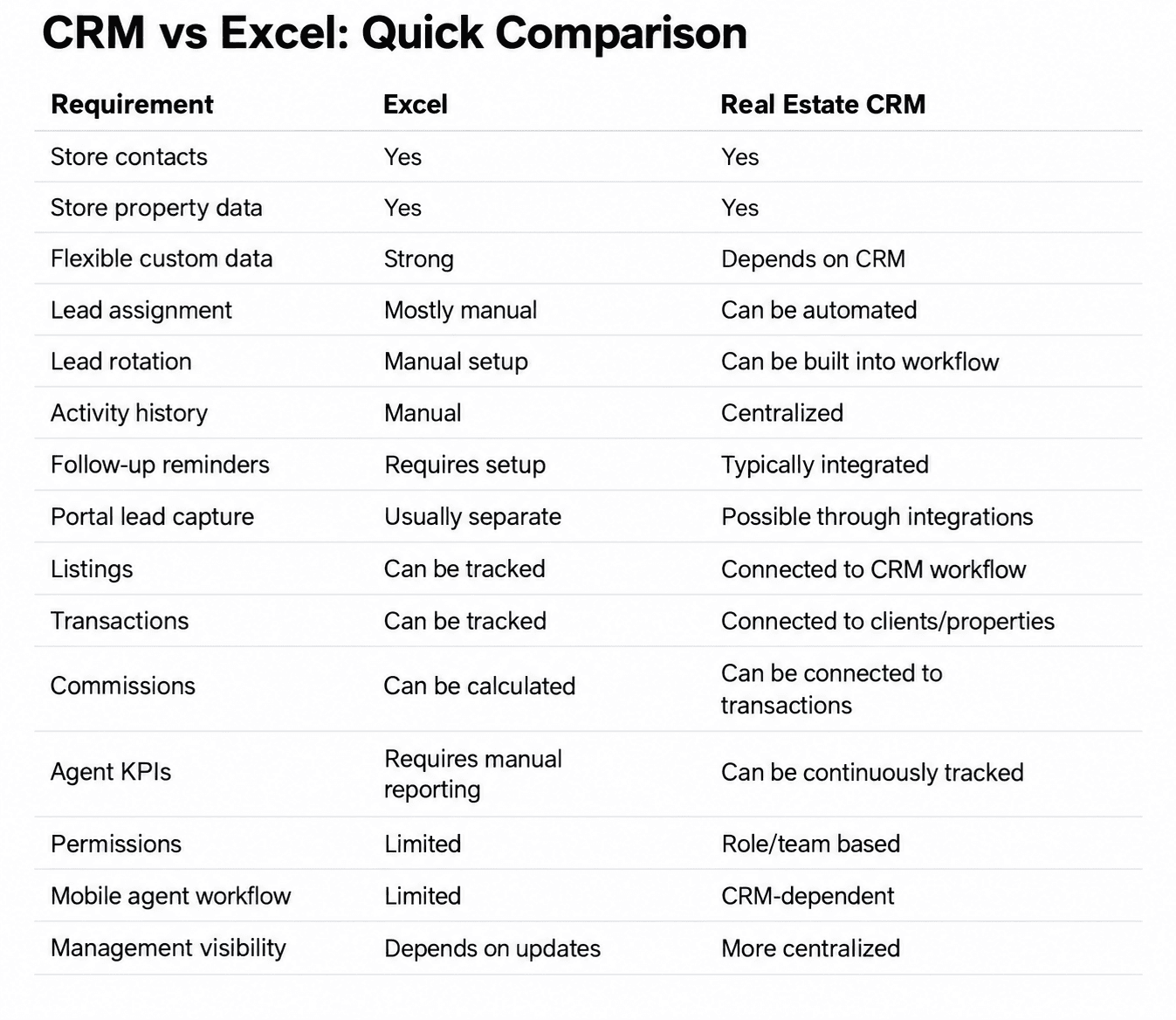
Neither column is automatically better in every situation.
The right choice depends on operational complexity.
When Is Excel Still Enough?
A spreadsheet may still be perfectly reasonable when:
The company has a very small team
Lead volume is low
One person manages most inquiries
There are limited listings
Follow-up is easy to control
Management doesn't need advanced activity tracking
Processes are relatively simple
There is no reason to introduce unnecessary software complexity.
When Should You Consider Moving to a CRM?
Consider a CRM when you start seeing several of these problems:
Leads are being missed
Managers manually assign every inquiry
Agents maintain separate databases
Follow-ups are inconsistent
Client information is scattered
Listings are difficult to control
Management cannot see agent activity
Reporting requires manual consolidation
Transaction tracking is becoming complex
Commission spreadsheets are becoming difficult to manage
Employees leave with important client information in personal files
The brokerage is expanding teams or branches
The strongest signal is usually this:
Management is spending increasing amounts of time asking people for information that should already be available.
A Simple Test for Brokerage Owners
Ask yourself these ten questions:
1. Can I see every new lead received today?
2. Can I see who received each one?
3. Can I see whether they were contacted?
4. Can I see the next follow-up?
5. Can I see all active listings?
6. Can I connect clients with relevant inventory?
7. Can I see upcoming viewings?
8. Can I see active transactions?
9. Can I see agent and team performance?
10. Can I get this information without messaging someone or requesting another spreadsheet?
If the answer to several questions is no, the brokerage may have outgrown a spreadsheet-based operating model.
Don't Move From Excel Before Cleaning Your Data
Buying a CRM shouldn't be the first step.
Before migration, clean the database.
Remove:
Duplicates
Invalid numbers
Old test records
Unnecessary columns
Inconsistent statuses
Then define what information actually needs to be migrated.
A messy Excel database moved into a CRM becomes a messy CRM database.
Technology doesn't automatically fix data quality.
How to Move From Excel to CRM
A practical migration can follow five stages:
1. Audit
Identify every spreadsheet currently used by the company.
2. Clean
Remove duplicate, outdated and unusable records.
3. Standardize
Agree on fields, statuses and naming conventions.
4. Map
Determine where each Excel field belongs in the CRM.
5. Train
Make sure employees understand how the new workflow replaces the old one.
And one rule is particularly important:
Avoid running Excel and the CRM as two permanent parallel systems.
If employees are expected to update both, adoption usually becomes more difficult.
How Pixxi Helps UAE Brokerages Move Beyond Spreadsheets
Pixxi CRM is built specifically for real estate brokerage operations in the UAE.
Instead of maintaining separate spreadsheets for leads, listings, databases, transactions and commissions, Pixxi brings these workflows into one environment.
Brokerages can use Pixxi to manage:
Leads
Lead assignment and rotation
Activities and follow-ups
Listings
Owners
Off-plan projects
Databases
Transactions
Commissions
Tasks
Approvals
Agent and team KPIs
The objective isn't to replace Excel for every business calculation.
Excel can remain an excellent analytical tool.
The objective is to stop using spreadsheets as the primary operating system for a brokerage once the business becomes too complex to manage that way.
Excel or CRM? Look at the Process, Not the Software
The decision isn't really:
Excel vs CRM.
It's:
Simple data management vs structured business operations.
Excel is an excellent tool.
But once your brokerage needs automatic lead distribution, structured follow-up, centralized inventory, transaction management, commission tracking and continuous management visibility, a real estate CRM can become the more appropriate operating environment.
The best time to make the switch is usually before operational complexity begins costing the company opportunities.
If your brokerage is currently operating through spreadsheets and you're considering the next step, book a Pixxi demo and we'll show you how your existing lead, listing and transaction processes can be structured inside one real estate CRM.
FAQ
Is Excel enough for a real estate agency?
It can be. Excel may work well for smaller teams with relatively simple workflows and low lead volumes. As the brokerage grows, centralized lead management, automation, activity tracking and management reporting can become more important.
What is the main difference between Excel and CRM?
Excel primarily organizes data. A CRM can connect data with users, activities, tasks, workflows, permissions, reporting and automation.
Can I import my existing Excel database into a CRM?
Many CRM platforms support data imports. Before migrating, the database should be cleaned, standardized and mapped to the appropriate CRM fields.
Can Excel track real estate leads?
Yes. Excel can track lead information and statuses. However, processes such as automatic assignment, reminders, activity histories and workflow automation typically require additional tools or a CRM.
Can a real estate CRM replace all spreadsheets?
Not necessarily. Spreadsheets remain useful for analysis, financial modelling and ad-hoc reporting. The goal is usually to avoid relying on them as the main system for daily brokerage operations.
What size brokerage needs a CRM?
There is no universal number of agents. Operational complexity is a better indicator than company size. A small brokerage receiving large lead volumes may benefit from CRM earlier than a larger company with simpler processes.
Experience the fastest, most complete real estate CRM on mobile
With Pixxi, your entire business travels with you real-time updates, instant lead access, and seamless team communication.